For most new AI and IoT projects in 2026, an ESP32-S3 is the better board to buy in New Zealand. Choose a classic ESP32 if you need Bluetooth Classic, including A2DP audio to a speaker or headset, or if you are reproducing a build that depends on the original chip. The two chips can look similar in a shop listing, but they differ in USB, memory options and Bluetooth, and those differences decide whether a project will actually work.
This comparison is for the original ESP32 series versus the ESP32-S3. Later chips such as the ESP32-C3 or ESP32-C6 are different again and are not covered here. The figures below come from Espressif’s chip series comparison and the official ESP32 and ESP32-S3 datasheets. Board-level details, such as how much flash is fitted or whether an antenna socket is present, still depend on the exact module you buy.
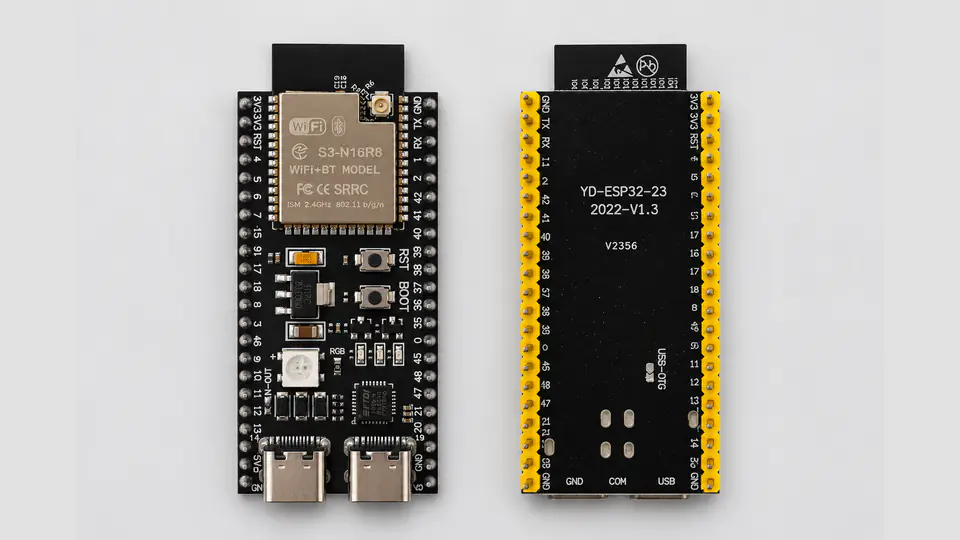
The cover illustrates two views of the same ESP32-S3 N16R8 board. See the original front and back photos for the board markings.
ESP32-S3 vs ESP32 at a glance
| Feature | Classic ESP32 | ESP32-S3 |
|---|---|---|
| Cores and clock | Dual-core Xtensa LX6, up to 240 MHz (a few single-core variants exist; ESP32-S0WD is typically 160 MHz) | Dual-core Xtensa LX7, up to 240 MHz |
| On-chip SRAM | 520 KB | 512 KB |
| PSRAM options | Most common modules have none. WROVER-class boards add external PSRAM, often 8 MB. A few chip variants include 2 MB in-package PSRAM | In-package PSRAM options of 0, 2, 8 or 16 MB. An N16R8 board has 8 MB of octal (OPI) PSRAM |
| Flash on typical maker boards | Often 4 MB; other sizes exist | Often 8 MB or 16 MB. N16R8 means 16 MB flash |
| USB | No on-chip USB controller. Boards use a separate USB-to-serial chip | Full-speed USB OTG, plus a USB Serial/JTAG controller |
| AI and DSP | No vector instruction extensions | Vector instruction extensions for neural-network and signal-processing workloads |
| Bluetooth | Bluetooth v4.2 Classic (BR/EDR) and Bluetooth LE. Classic mode can stream A2DP audio | Bluetooth 5 (LE) only. No Bluetooth Classic and no A2DP |
| Wi-Fi | 2.4 GHz 802.11 b/g/n | 2.4 GHz 802.11 b/g/n |
| Programmable GPIOs | 34 on the chip (fewer are free once flash and other functions are in use) | 45 on the chip (fewer are free on an N16R8 board once flash, PSRAM, USB and strapping pins are reserved) |
| Typical use | Bluetooth speakers, A2DP headsets, simple sensors, and older projects already written for ESP32 | New IoT builds, USB gadgets, displays, Wi-Fi audio and on-device voice or AI |
The on-chip SRAM figures are close enough that they rarely decide a purchase on their own. The practical memory difference is PSRAM. Image buffers, audio streams and many voice or display projects need that extra RAM, and a board without it will run out of room even if the CPU looks similar on paper.
Bluetooth Classic is the main reason to still buy an ESP32
This is the point that product listings often blur. A classic ESP32 is a dual-mode chip: it speaks Bluetooth Classic and Bluetooth LE. That Classic radio is what lets a board appear as a standard Bluetooth speaker or headset and use A2DP.
An ESP32-S3 speaks Bluetooth 5 Low Energy only. It can still do BLE sensors, provisioning and many modern wireless accessories, but it cannot open a Classic A2DP link. If your project is “press play on the phone and hear it on a speaker attached to the board”, you need a classic ESP32, or a later chip that has explicitly brought Classic Bluetooth back. The S3 is not that chip.
For almost everything else — Wi-Fi sensors, Home Assistant nodes, camera or display work, and cloud or local voice assistants — BLE is enough, and the S3 is the more capable starting point.
USB, AI instructions and why N16R8 is a sensible default
The original ESP32 has no USB controller on the chip. You flash it through a USB-to-serial chip on the development board. That works, but the board cannot present itself as a USB keyboard, mouse or serial gadget on its own.
The ESP32-S3 has native full-speed USB OTG and a USB Serial/JTAG controller. On the ESP32-S3 N16R8 dual USB-C board we stock, that is split across two ports: one goes through an FT232R USB-to-serial chip for flashing and logs, and the other connects to the chip’s native USB. We also list an ESP32-S3 N16R8 board with pre-soldered headers. Both listings show boards with soldered headers and two USB-C connectors. Confirm the port labels on the board in front of you before you plug in.
The S3 also adds vector instructions aimed at AI and digital signal processing. Espressif exposes them through libraries such as ESP-NN and ESP-DSP. They help with on-device audio and small neural-network work; they are not a substitute for a full Python machine-learning computer. Voice and display projects still benefit most from the 8 MB of PSRAM on an N16R8 board.
N16R8 is a memory label, not a brand: N16 is 16 MB of flash and R8 is 8 MB of PSRAM. The Arduino IDE assumes a smaller board until you set 16 MB flash and OPI PSRAM. That setup is in the ESP32-S3 N16R8 getting-started guide.
As of 25 November 2026 (NZDT), the dual USB-C N16R8 board is NZ$21.90 and the pre-soldered-header N16R8 board is NZ$24.90; check the product pages for the current price and stock.
Antenna, Wi-Fi and a ready-made S3 project
Both chips use 2.4 GHz Wi-Fi only. If a board cannot see your home network, check that the 2.4 GHz band is enabled; a 5 GHz-only SSID will not work.
The dual USB-C board we stock has a PCB antenna and an IPEX (U.FL) socket. A 5 dBi FPC Wi-Fi antenna is sold separately if you later mount the board in a case or a shed. Boards of this kind often need a small antenna-selection change before the external socket is used, so read the notes for your exact board first. Measuring signal strength and deciding when an external antenna is worth fitting is covered in ESP32-S3 Wi-Fi range in a 3D-printed case.
If the project you want is a voice assistant and you would rather not wire a microphone and amplifier yourself, we also stock an assembled ESP32-S3 Wi-Fi AI voice assistant. The from-scratch parts list and wiring are in How to build an ESP32-S3 AI voice assistant.
Which board should you buy?
- Buy an ESP32-S3 N16R8 for new IoT work, USB gadgets, displays, and AI or voice projects. That is the board family we recommend and stock.
- Buy a classic ESP32 if the project depends on Bluetooth Classic, including A2DP, or was written for the original chip. We do not currently list a classic ESP32 board.
- Do not choose on clock speed alone. Both series reach 240 MHz. The useful differences are USB, PSRAM and Bluetooth.
- Check the memory label, then confirm it on the desk. A listing that says N16R8 should report 16 MB of flash and working 8 MB PSRAM. Where to buy ESP32 in NZ covers delivery, GST and how to run that check.
Browse the ESP32 boards in NZ we stock, with courier delivery across New Zealand or free pickup in Torbay, Auckland.
About the figures in this article. Chip features are taken from Espressif’s published comparison and datasheets, checked on 25 November 2026. Board photographs, port labels and fitted memory can still differ by supplier, so confirm the markings on your own board.
For current prices and stock, see the dual USB-C N16R8 board and the N16R8 board with pre-soldered headers.